What Software Does a PHP Developer Use? Essential Tools Explained
What Software Does a PHP Developer Use? Essential Tools Explained
If you are learning PHP or planning to work with a PHP developer, you may wonder what software developers actually use to build and maintain PHP websites and web applications.
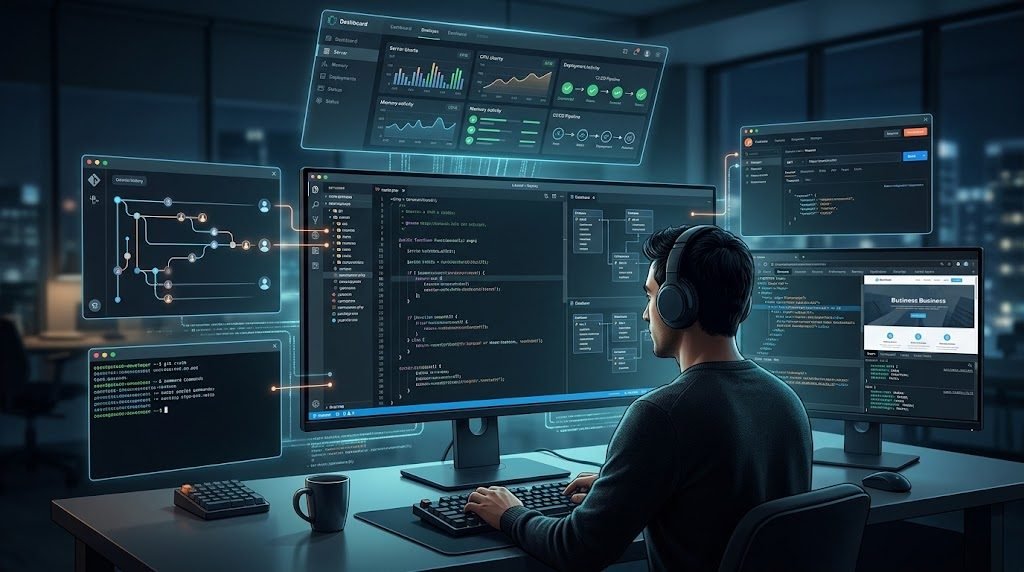
The answer is not one single program. A professional PHP developer normally uses a collection of tools for writing code, running applications locally, managing databases, testing APIs, tracking changes, debugging problems, and deploying projects to a server.
The exact software depends on the developer, operating system, project, framework, and hosting environment. However, most PHP development workflows contain several common categories of tools.
For a broader explanation of the role itself, read What Is a PHP Developer? Roles, Skills and What They Do .
What Software Does a PHP Developer Use?
A PHP developer may use software for several different stages of development.
- Writing and editing code
- Running PHP applications locally
- Managing databases
- Installing project dependencies
- Tracking source code changes
- Testing APIs
- Debugging applications
- Managing servers and deployment
- Testing websites in browsers
There is no universal toolset. Developers normally choose software that fits the needs of the project and their own workflow.
1. Code Editors and IDEs
One of the most important pieces of software for a PHP developer is the code editor or integrated development environment, commonly called an IDE.
This is where developers write, read, search, refactor, and organise application code.
Useful editor features can include:
- PHP syntax highlighting
- Code completion
- Code navigation
- Search and replace
- Integrated terminal
- Git integration
- Debugging support
- Extensions and plugins
The specific editor is largely a matter of workflow and preference. What matters most is whether the development environment helps the developer work efficiently and maintain a large codebase.
2. PHP Runtime
A PHP application needs a PHP runtime in order to execute PHP code.
During development, a developer normally installs a suitable PHP version on the local computer or uses a local development environment that provides PHP.
Different projects may require different PHP versions, so developers also need to pay attention to version compatibility.
This becomes especially important when maintaining an existing application because changing the PHP version can sometimes affect dependencies or application behaviour.
3. Local Development Environments
Developers usually need a way to run a website or web application locally before publishing changes to a live server.
A local development setup may include:
- PHP
- A web server
- A database server
- Command-line tools
- Project dependencies
The exact setup differs between developers and projects. Some developers install each component separately, while others use an integrated local development environment.
The purpose is the same: build and test the application safely before changes are deployed to production.
4. Database Management Software
Many PHP applications depend heavily on databases, so database software is an important part of the PHP development workflow.
Developers may need to create tables, inspect records, run queries, check relationships, investigate errors, and analyse application data.
Database tools are useful for tasks such as:
- Creating databases
- Managing tables
- Running SQL queries
- Inspecting data
- Checking relationships
- Exporting and importing data
- Investigating database problems
A good PHP developer should also understand SQL rather than relying entirely on graphical database tools.
5. Composer for PHP Dependencies
Composer is an important part of many modern PHP development workflows.
It is used to manage PHP project dependencies and install packages required by an application.
Instead of manually downloading every library, a project can define its dependencies and use Composer to install and manage them.
Composer is useful for:
- Installing PHP packages
- Managing dependencies
- Updating packages
- Autoloading application classes
- Keeping project dependencies organised
Framework-based applications, including many Laravel projects, commonly depend on Composer as part of their development workflow.
6. Git and Version Control Software
Git is widely used for tracking changes to source code.
Version control allows developers to see what changed, create branches, experiment with new features, and return to earlier versions when necessary.
Common Git tasks include:
- Creating commits
- Creating branches
- Merging changes
- Reviewing differences
- Working with remote repositories
- Reverting unwanted changes
For professional development, version control is especially useful when multiple people work on the same project or when an application is being developed over a long period.
7. Terminal and Command-Line Tools
PHP development often involves the command line.
Developers may use a terminal to install dependencies, run framework commands, create migrations, execute tests, inspect logs, manage Git, connect to servers, and perform deployment tasks.
For Laravel projects, command-line tools can also be used to perform many framework-specific development tasks.
Learning the terminal can therefore make a PHP developer much more efficient, especially when working with production servers and automated workflows.
8. API Testing Tools
Modern web applications often communicate with APIs, so developers need ways to test HTTP requests and responses.
API testing tools can help developers send requests, inspect responses, test authentication, and reproduce API-related problems.
Typical API testing tasks include:
- Sending GET requests
- Testing POST requests
- Sending JSON data
- Testing authentication
- Checking status codes
- Inspecting API responses
- Testing error conditions
This becomes particularly important when a PHP backend communicates with mobile applications, frontend applications, payment services, or other external systems.
9. Browser Developer Tools
Even a backend-focused PHP developer needs to understand what happens in the browser.
Modern browsers provide developer tools that can help inspect HTML, CSS, JavaScript, network requests, cookies, storage, and page performance.
Browser developer tools are useful for investigating issues such as:
- Failed network requests
- Incorrect API responses
- Frontend errors
- Broken styling
- Missing assets
- Slow network requests
This makes browser tools useful even when the primary application logic is written in PHP.
10. Debugging and Logging Tools
Real applications eventually encounter errors. Developers therefore need tools and techniques for understanding what went wrong.
Debugging can involve code-level debugging, application logs, server logs, database checks, request inspection, and controlled testing.
Good debugging tools help developers answer questions such as:
- Where did the error occur?
- What request caused it?
- What data was received?
- Which database operation failed?
- Did an external API return an error?
- Did a recent code change introduce the problem?
Debugging is one of the reasons practical project experience is so valuable for a PHP developer.
11. Server and SSH Tools
Once a PHP application is deployed, developers may need to work directly with the server.
Depending on the hosting environment, this can include connecting through SSH, inspecting files, running commands, checking logs, managing PHP versions, and deploying application updates.
Server management responsibilities vary significantly depending on the hosting provider and project architecture.
12. File Transfer and Deployment Tools
Developers also need ways to move application files and deploy updates.
A deployment workflow can range from manually uploading files to using a version-controlled automated deployment system.
The appropriate approach depends on the project, hosting environment, security requirements, team structure, and how frequently the application is updated.
13. Project Documentation Tools
Software development is easier to maintain when important project information is documented.
Developers may use documentation tools to record:
- Installation instructions
- Environment configuration
- API information
- Database notes
- Deployment procedures
- Known issues
- Development decisions
Good documentation becomes especially valuable when another developer joins the project later.
14. Testing Tools
Testing helps developers verify that application features continue to work after changes are made.
Depending on the project, testing may include unit tests, feature tests, integration testing, API testing, browser testing, or manual testing.
A strong development workflow does not rely only on checking whether a page looks correct. Important application behaviour should also be tested.
15. Package and Framework Tools
PHP developers often use framework-specific tools in addition to PHP itself.
Laravel, for example, provides a structured application environment with commands and tools for routing, migrations, database access, queues, authentication, caching, mail, and other common development tasks.
If you are interested in how Laravel fits into the wider technology stack, read How to Choose the Right Web Development Framework in 2026 .
Does Every PHP Developer Use the Same Software?
No. There is no single required software package that every PHP developer must use.
Developers choose tools based on factors such as:
- Operating system
- Project type
- Programming framework
- Database system
- Team workflow
- Hosting environment
- Personal preference
- Company development standards
Two experienced PHP developers may use different editors and different local development setups while still producing reliable software.
What Software Does a Laravel Developer Use?
A Laravel developer uses many of the same tools as other PHP developers, but also works with Laravel-specific commands and project structures.
A typical Laravel workflow may involve:
- A code editor or IDE
- PHP
- Composer
- Laravel CLI tools
- A database
- Git
- A terminal
- Browser developer tools
- API testing tools
- Deployment and server tools
You can explore LuqmanDev's PHP and Laravel development services if you are planning a custom web application.
Which Tools Should a Beginner PHP Developer Learn First?
Beginners do not need to install dozens of tools at the same time. A simple development setup is usually easier to understand.
A practical starting point can include:
- A code editor or IDE
- PHP
- A local development environment
- A database
- Composer
- Git
- A web browser with developer tools
- A terminal
Once these tools are familiar, you can add API testing, automated testing, deployment tools, and other software as your projects become more advanced.
For a complete learning path, read How to Become a PHP Developer: A Practical Roadmap .
How the Tools Work Together
The real value of these tools comes from how they work together rather than from any individual piece of software.
For example, a developer might write code in an editor, run the application locally with PHP, store information in a database, install dependencies through Composer, track changes with Git, test an API, inspect browser requests, and then deploy the finished application to a server.
Each tool solves a different part of the development workflow.
Example PHP Development Workflow
- Define the feature requirements.
- Write or update the application code.
- Install or update required dependencies.
- Run the application locally.
- Test the feature.
- Inspect logs and fix problems.
- Test database operations and APIs.
- Commit the changes with Git.
- Deploy the update.
- Verify the production application.
The exact workflow can vary depending on the team and project, but the general process is similar across many professional development environments.
Why Software Choice Matters
Development tools can influence productivity, consistency, debugging, collaboration, and maintenance.
However, better software does not automatically make someone a better developer. Understanding programming concepts, application architecture, databases, security, testing, and problem solving remains more important than choosing a particular editor or development tool.
A developer should choose tools that support the project's requirements instead of selecting software simply because it is popular.
What Should a Business Ask a PHP Developer About Their Tools?
A business usually does not need to choose the developer's code editor or personal development software. What matters more is whether the developer has a reliable development workflow.
You can ask:
- How do you manage source code?
- How do you test changes before deployment?
- How do you handle backups?
- How do you manage dependencies?
- How do you troubleshoot production problems?
- How are deployments performed?
- How is project documentation maintained?
These questions can provide more useful information than simply asking which code editor the developer prefers.
PHP Developer Software for Professional Projects
The software used by a PHP developer can vary widely, but a professional workflow normally involves tools for coding, dependencies, databases, version control, testing, debugging, and deployment.
The exact combination should be selected according to the application's size, technology stack, team, hosting environment, and maintenance needs.
If you are evaluating a developer for your own project, you may also find What Should You Look for in a Web Developer in Kabul? useful.
Frequently Asked Questions
What software does a PHP developer use?
PHP developers commonly use software for coding, PHP runtime management, databases, dependency management, version control, API testing, debugging, browser inspection, server management, and deployment.
Do PHP developers use an IDE?
Some developers use full IDEs while others prefer lightweight code editors. The choice depends on the developer, project, operating system, and workflow.
Does a PHP developer need Composer?
Many modern PHP applications use Composer for dependency management and autoloading, especially framework-based projects.
Do PHP developers use Git?
Git is widely useful for tracking source code changes, collaboration, branching, reviewing changes, and maintaining project history.
Does a PHP developer need database software?
For database-driven applications, developers need ways to create, inspect, query, and manage databases. The specific database software depends on the application.
What software should a beginner PHP developer install?
A beginner can start with a code editor, PHP, a local development environment, a database, Composer, Git, a terminal, and a modern browser. More specialised tools can be added as projects become more advanced.
Explore LuqmanDev Services
If you need PHP, Laravel, web application, WordPress, mobile app, or SEO development, you can explore LuqmanDev services to see the available development options.
You can also view the LuqmanDev portfolio to explore real websites, applications, and digital products.
Have a PHP or Laravel project in mind? Contact LuqmanDev to discuss your requirements and define a practical project scope.
Conclusion
A PHP developer normally uses a collection of software rather than one single program. Code editors, PHP, local development environments, databases, Composer, Git, API testing tools, browser developer tools, debugging utilities, terminal tools, and deployment software can all form part of the development workflow.
The exact tools are less important than knowing how to use them effectively. A strong PHP developer understands the complete development process and chooses software that helps build, test, secure, deploy, and maintain reliable applications.
As projects become more advanced, the development toolkit usually grows with them. The best approach is to learn the essential tools first and then add specialised software as your development requirements increase.
Need a PHP or Laravel project?
Tell us what you want to build, improve, or maintain.